

What you’ll learn in this guide
How to:- prepare your CRM for repeated automatic enrichments
- query your CRM to always refresh the most relevant contact first
- enrich relevant contacts with lemlist’s enrichment API
- update your CRM records depending on whether the contact changed positions or not
Imagine…
Imagine if you knew when contacts working at client companies started working for a company that’s not your client yet ;) it would definitely warrant an outreach like:HeyThe crux of the matter now, is to refresh your CRM contacts on a regular basis to know when such a career change occurs.firstName, i hope you’re doing ok. I just went on LinkedIn and realized you weren’t working forcompanyNameanymore. Why did you leave?
Refresh your CRM Contacts automatically every 6 months
Overview
We want to:- refresh the LinkedIn information of CRM contacts with this endpoint from the lemlist API (every 6 months for instance — enough time for them to have changed jobs or companies). We could even look for contacts’ phone numbers and emails if we don’t have them already.
- update their information, based on the result of the LinkedIn enrichment, and update the date of the last enrichment (which will help us make sure that we always refresh the contacts that have not been enriched for the longest time)
- and then, if the contact changed companies (judging by the company domain), we want to:
- insert the company in the CRM (if it’s not there yet)
- associate the contact to its new company
- you’re using HubSpot CRM
- that you’re saving the LinkedIn profile URLs of a significant portion of your contacts
Create a new date field in your CRM
If we want to refresh contacts every 6 months, and always enrich the contact that has not been refreshed for the longest time, then we need to keep track of the enrichment date somewhere. Which is why, we need to create aLast Enrichment Date field in HubSpot to… keep track of the last enrichment date with the lemlist API 🙃
creating Last Enrichment Date field in HubSpot
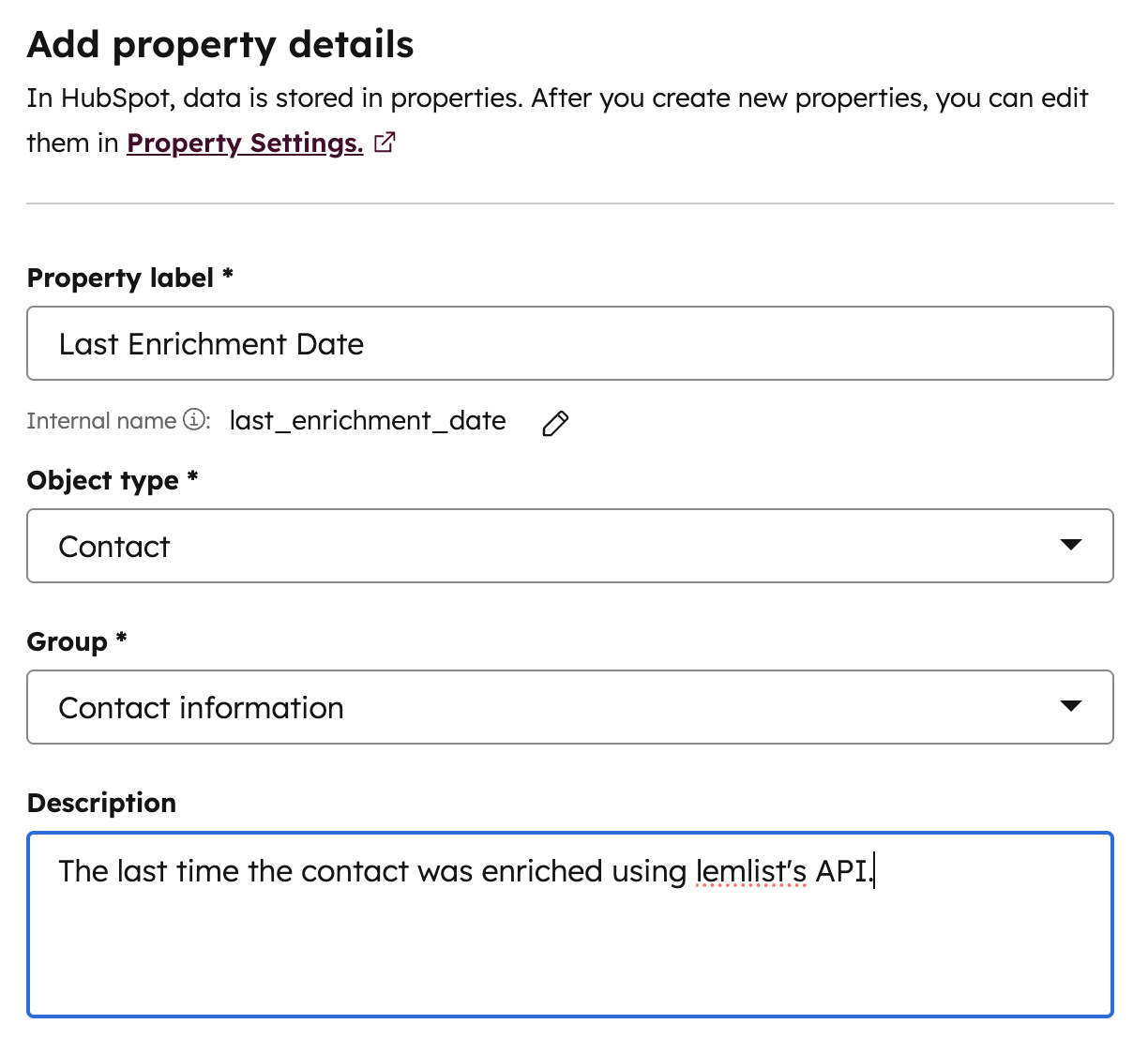
The final settings
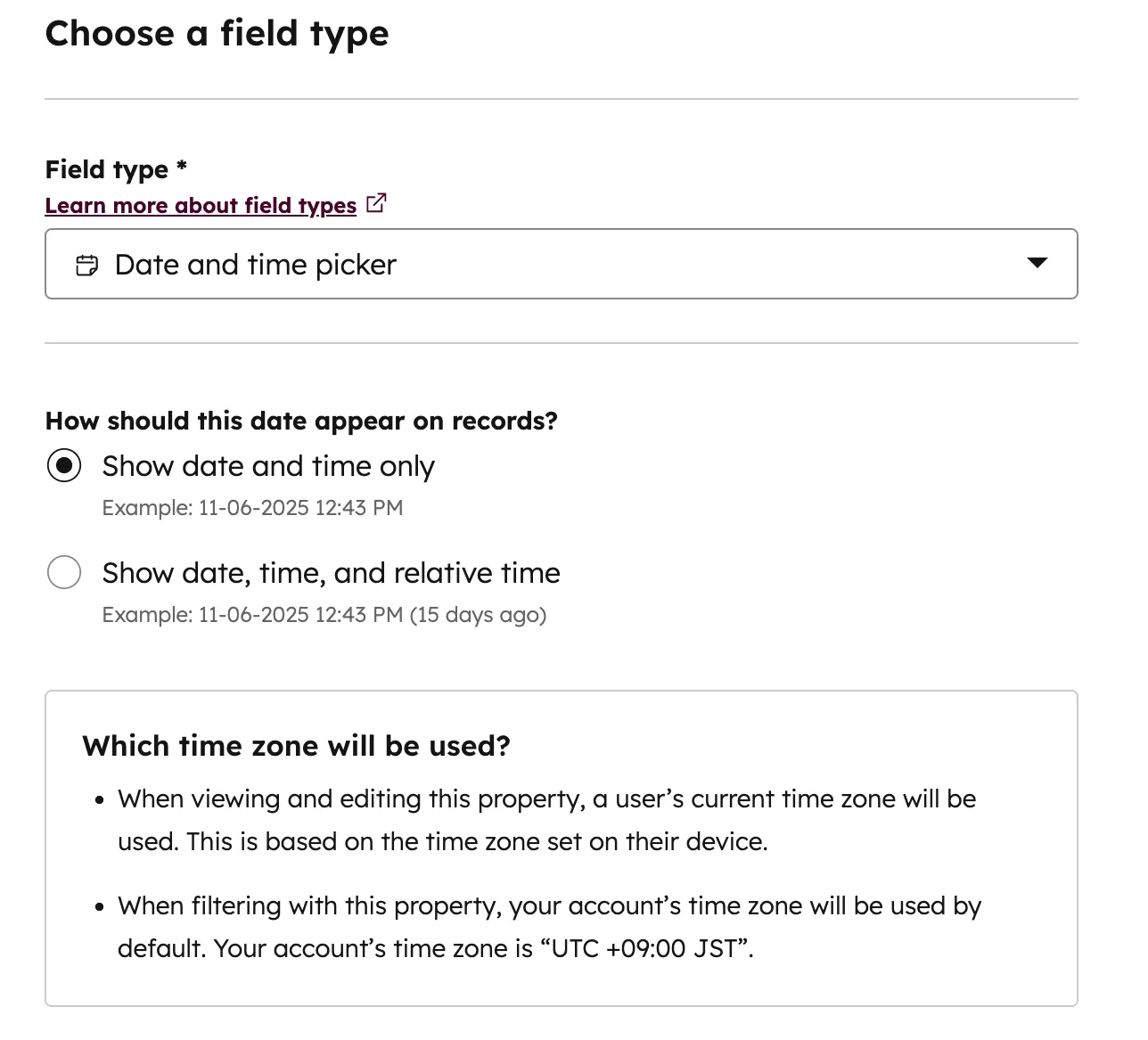
Don't forget to set the field type
Query the first contact up for refresh in HubSpot
Who’s the contact “up for refresh”?It’s the contact that:
- has a LinkedIn Profile URL
- has not been refreshed the past 6 months
- has not been refreshed for the longest time
- Go to n8n and create a new workflow with a Schedule node as trigger.
Let’s assume that we have 2 196 contacts (because why not 🌝). We said that we wanted to refresh them all every 6 months i.e. (3 * 30 + 3 * 31) * 24 hours = 4 392 hours.
Since 4 392 / 2 196 = 2, it means that we should schedule the trigger to launch every 2 hours BUT the number of contacts in the CRM with a LinkedIn URL might grow in the next few months, so let’s add a buffer by launching once an hour.
It will take 3 months to refresh everyone right now, but it could take more time as the number of contacts increases.
adding schedule trigger in n8n
- Chain a HTTP node to your trigger to perform a custom API call to HubSpot. Read this doc, if you’re connecting n8n to HubSpot for the first time to authenticate properly (in the future, i’ll assume that you’re using App Token auth)
Why not use the default Search Contacts HubSpot node in n8n? Because it does not allow to filter on our newly created Last Enrichment Date unfortunately.
HubSpot search curl example
importing curl in HTTP node
- Let’s adapt the filters to our specific case.
We want:
- profiles with a LinkedIn URL that have never been refreshed
- or profiles with a LinkedIn URL that have been refreshed more than 6mo ago And we want:
- results sorted by ascending order of refresh date (if any)
- limited to the first result only Which translates into the following expression in our HTTP node:
n8n HTTP node expression
Finish by executing the node and pinning results.
Get associated company data
We just reached a big milestone, but we’re not done. You’ll notice that, by default, HubSpot’s search endpoint returns little data on the company associated to the contact.Why do we need company data anyway?Because, ultimately, we want to enrich the contact and check if they’ve changed companies by comparing their website domains. Soooo… we need the associated company’s website domain. Here’s how to fall back on our feet:
- Chain a “Get Contact” HubSpot node to the our existing workflow. This time, the default n8n node will do just fine:
It will give us the ID of the associated company. Make sure to test the node and pin its result.
- Which is why we’ll also chain a “Get Company” node to the “Get Contact” one. And this one will finally give us the company’s domain.
Make sure to test that node too and pin its result before moving on.
Enrich the contact with the lemlist API
As i said during the introduction, i’m trying to “LinkedIn-enrich” my CRM contacts. That’s why i specifically queried a CRM contact with a LinkedIn URL — knowing that LinkedIn is the best enrichment source for job changes. It’s time to use the lemlist enrichment endpoint to get that data. Here’s the thing though: data enrichment is asynchronous, meaning that by default, the endpoint won’t return the enrichment result. It will return an id that you can use later on to query this other endpoint to get enrichment results. Alternatively, in the first endpoint, you can send a webhook url in your query so that lemlist returns the enrichment results automatically upon completion. That’s what we’ll do here. It will save us a lot of time and complexity. That being said, the lemlist default node won’t let you set a webhook url, which is why we’ll have to use a custom API call again. So:- Go to the lemlist API docs playground, set random parameters (including a webhook URL), copy the curl and, again, import it in a HTTP node chained at the end of your workflow:
Replace your makeshift variables with the data from your 'Contact Search' node but do NOT execute that node yet.
- Then — and that’s the trick — add a “Wait” node to the workflow and select the “Resume on webhook call” option. You get the gist: the workflow won’t resume until the lemlist enrichment is done and the workflow received enrichment results! How convenient 😌
adding wait for webhook call node
- Once the wait node added, go back to the HTTP Node, and set the webhook url parameter to the following expression:
{{ $execution.resumeUrl }} - Finally, execute the whole workflow (with pinned data in the first nodes) and let magic happen. It shouldn’t take long for lemlist to send back the enriched data ;) Don’t forget to pin the enrichment data!
Compare old and new company
Chain an “if” node to the workflow, configured as such to check whether the contact has changed companies or not: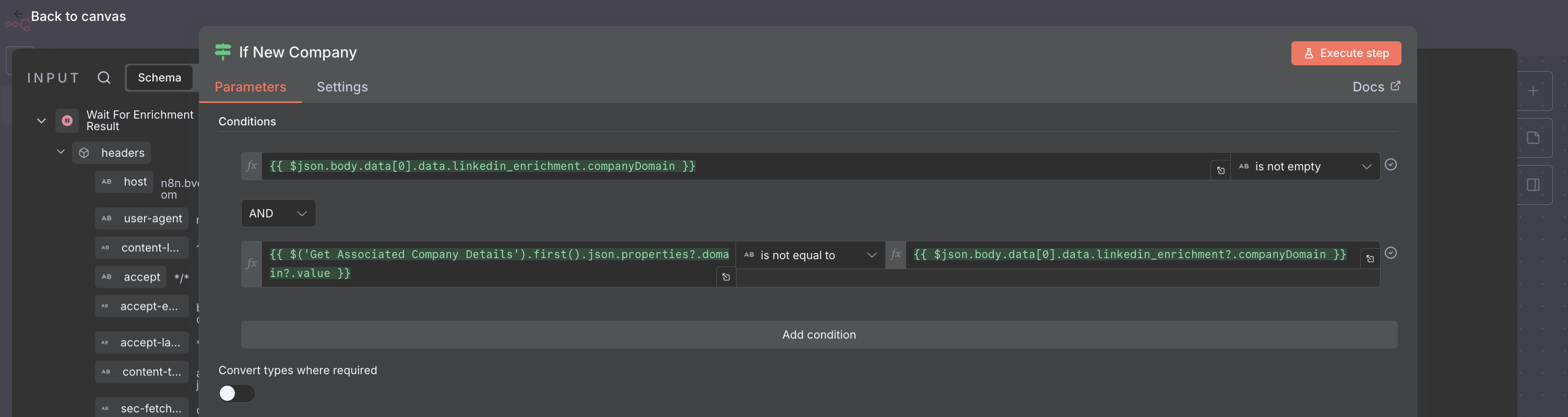
- the company domain found by lemlist is not empty
- and that the domain recorded in HubSpot is different from the one we just go
Update CRM records accordingly
If the contact changed companies
- Let’s first check if that company exists in the CRM or not with the default “Search company by domain” HubSpot node:
Don't forget to set the node to 'always output data'
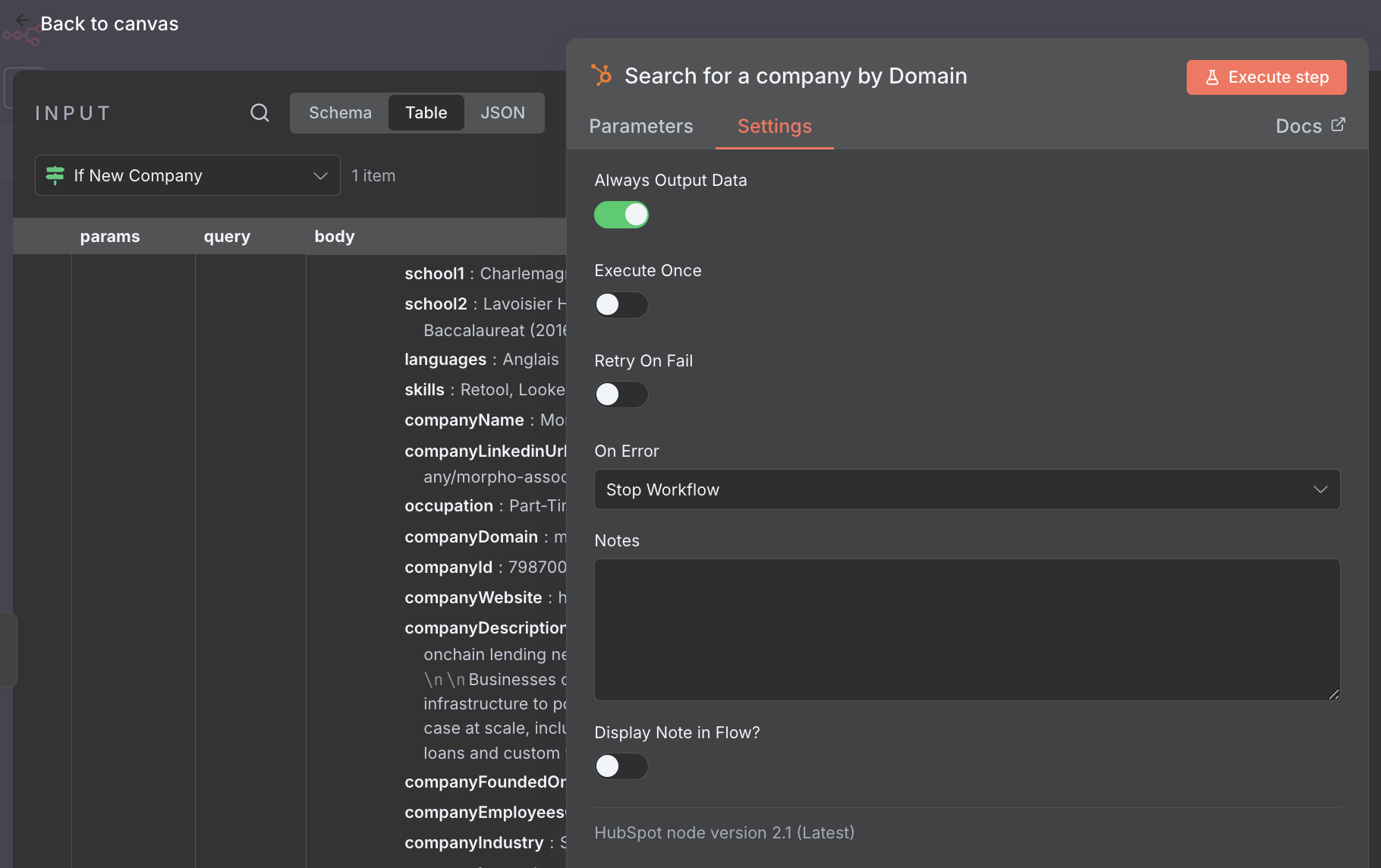
This way, even if no result is found in HubSpot, the workflow won't stop.
- Chain a new “if” node to check whether the input is empty or not
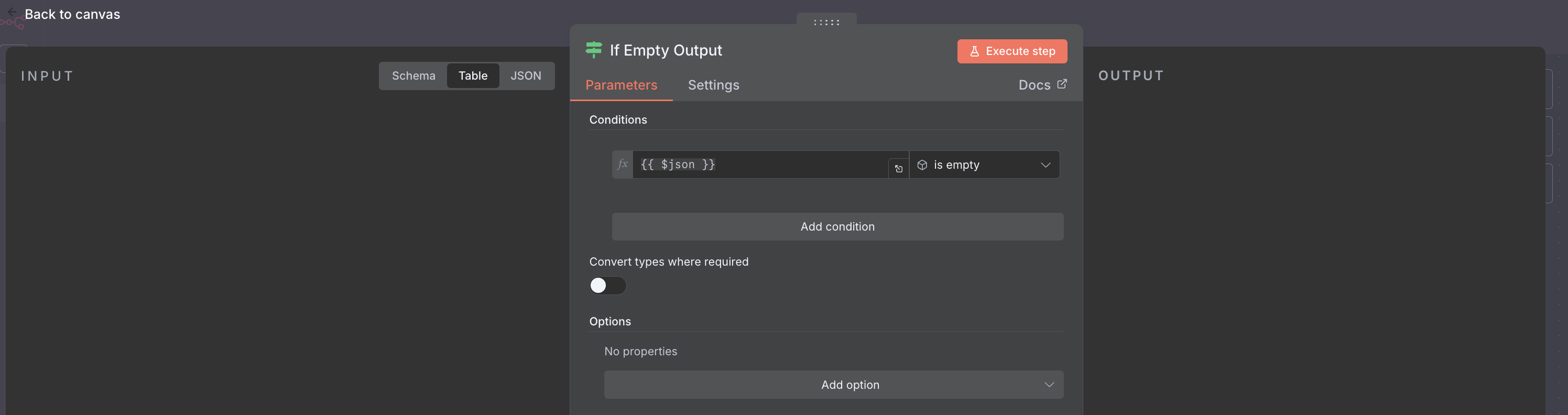
- Then, if:
- the output is empty (meaning that the new company isn’t in the CRM yet), then create that new company and update the contact association to be associated to that new company
It should look like this once configured.
- the output is not empty, meaning that the company was found in the CRM, and in that case, simply update the contact association to that existing company.
And look, there's just a small change to operate in our workflow, thanks to the consistent schemas of HubSpot's endpoints.
- the output is empty (meaning that the new company isn’t in the CRM yet), then create that new company and update the contact association to be associated to that new company
- Finally, add another node to update the contact’s
Last Enrichment Date.You'll understand in the next section why we didn't do it in the same node as the one created at step 3 ;)
If the contact didn’t change companies
Then, it couldn’t be any simpler, we just need to update theLast Enrichment Date on the contact, and that’s how:
updating contact when no company change